New updates include general LabArchives ELN updates, LabArchives Inventory updates for enterprise license holders, API report support, and API Notebook IDs.
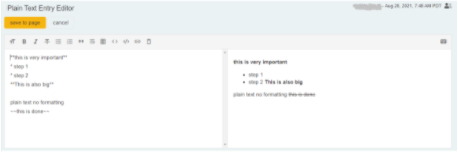
New Plain Text entry, better mobile experience
Supports Markdown
Added toolbar
Preview formatting
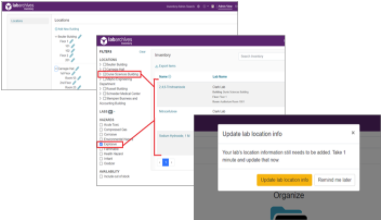
New Functionality in LabArchives Inventory
Assign locations across organizations and campuses, organization-wide
Filter by location
LabArchives ELN API added two new classes of Site Admin API functions
These are exciting times in the ELN and LabArchives communities as many students head back to school and once again open their electronic lab notebooks to commence with experiments and data logging. The great return to work is not the only reason for excitement. We also have some updates for the ways users of the LabArchives platform can utilize the LabArchives products. We will look at general LabArchives ELN updates, LabArchives Inventory updates for enterprise license holders, API report support, and API Notebook IDs.
First on the list are general updates to the ELN environment. As we continue to update page functions, we have released a new version of the Plain Text entry, which is more accessible and friendly for mobile use. In addition, this type of entry supports Markdown, a simple markup language for formatting text. This update also includes a toolbar that displays options to allow Markdown users to preview formatting before they save it.
Next up are LabArchives Inventory updates for those with an enterprise license. These new features will allow designated inventory admins to assign locations for inventory across the campus and make that inventory available for Lab Managers. Inventory is filterable by location, so a manager will know what they have access to in any given location. It is important to note that once locations are added, LabArchives Inventory Admins can use the Location filters in combination with inventory item name search and Hazard Category filters to zero in on specific chemicals, compounds, and other reagents of interest.
Also included for enterprise license holders who develop software using the LabArchives ELN API are two new classes of Site Admin API functions. First are new Site Report methods, which allow for retrieval of usage reports for notebooks. The Site Reports API methods allow programmers to pull down ELN reports also available from the Site Admin tool: Detailed Usage Report, Detailed Notebook Report, PDF/Offline Notebook Generation Report.
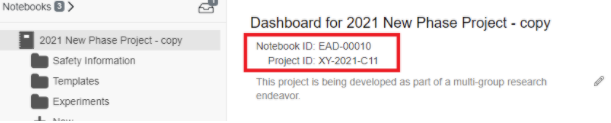
The second class of new API additions are for Notebook IDs, which allow the institution to define four ID types (e.g., Notebook ID, Project ID, etc.) and add corresponding IDs to notebooks. The API can be used to add IDs to notebooks generated from internal grants/project management systems or in the case of a multi-site collaboration project to connect the research data and metadata to the various other project assets tracked in other systems.
To gain access to the new Site Admin API methods, we’ll need to take the following steps:
The person(s) who will be accessing the API must first create a LabArchives account.
Notify your Enterprise Success Team contact of the name and email of the person(s) who should have Site Admin API access so that we can give their account access.
You will be provided with API development documentation that will be required by the programmers.
You will be provided with an API key required to utilize the API.
For any questions, please reach out to LabArchives support.
Across research and technical teams, one instinct keeps winning: move fast and stay flexible,. Call it vibecoding. It feels efficient, modern, and cheaper, because there are no new systems to stand up and no hours lost to recordkeeping. But that feeling is an illusion. You cannot vibe your way to compliance, and the moment your work has to be shared, reproduced, or audited, the shortcut reveals itself for what it always was: a deferred expense with higher interest.
Tracking individual aliquots across experiments, team members, and storage locations can quickly become difficult. New Aliquot Management in LabArchives Inventory makes it easier to create aliquots in bulk, monitor each one individually, and connect samples directly to experimental data, all while maintaining complete traceability.
Every week, your shared research resources run nonstop. Instruments hum, grants fund the work, faculty publish. The engine is running. But could you produce, today, a single structured report showing which resources drove which grants and papers over the past three years? In most institutions, not without weeks of manual work, and likely with gaps. That is not a storage problem. It is an attribution problem, and it is quietly becoming a funding risk.
Most SaaS providers treat vulnerability management as a periodic compliance exercise. FedRAMP® does not. Achieving FedRAMP authorization required LabArchives to build a continuous, deeply scrutinized vulnerability management program covering everything from code and infrastructure to containers, databases, and penetration testing. The result is a stronger security posture that benefits not only government agencies, but every LabArchives customer.

 Record, organize, search and share your scientific data
 Streamline organizing, tracking and ordering lab inventory
 Manage and schedule lab equipment and resources
 Secure, compliant, government-approved solution