LabArchives is continuously working to improve our product offerings. Here are some of the exciting new platform releases.
Inventory – Integration with ELN for Research
With this release, LabArchives Inventory users will be able to search their Inventory and easily add items to the Inventory list without leaving the notebook page. Users can maintain an accurate list of items used in protocols while simultaneously reporting on usage of reagents and other Inventory items. Bi-directional links connect the entry in the Notebook with the Inventory items for quick reference. Learn more about the Inventory List.
Inventory – Printer Agnostic – Create and Use Labels and QR Codes
LabArchives Inventory now provides several options for creating and using QR codes to work with a printer of your choice. Each item in the inventory will have a label automatically created. These labels have a QR code that can be printed and later scanned using the camera built into LabArchives Inventory on a mobile device. Learn more about using QR codes.
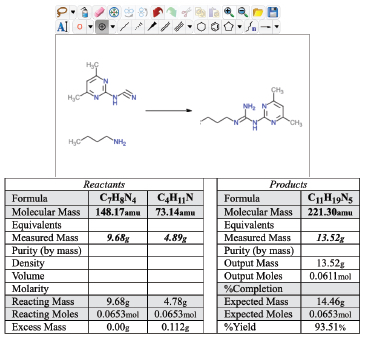
Chemical Sketcher Widget NOW with Stoichiometry
Automatically generated stoichiometry tables allow you to understand the relative quantities of each substance that takes part in a reaction or a compound that is formed without having to make these calculations by hand, which can be time consuming and can be error prone. After drawing a chemical reaction, you can create a stoichiometry table to quickly calculate multiple parameters of the reaction drawn. Learn more about the Chemical Sketcher Widget.
Large File Upload Options Expanded
LabArchives now provides additional options for large files (larger than 250MB) for our Enterprise customers. If your institution has not yet enabled this option, there are additional options to consider:
- LabArchives – S3 4GB
- LabArchives – S3 16GB
- Integration with Box – 15GB
- Integration with S3 – 16GB
- Integration with Microsoft OneDrive – 16GB
LabArchives Adds Server in the European Union
LabArchives expanded our cloud server offering to include an EU-based server in Frankfurt, Germany, with a disaster recovery server in Paris, France. New users in the EU will be able to start their LabArchives accounts on the new server, while existing customers in the EU will remain on their current server with accounts gradually transitioning over time. If you are interested in transferring your account, please contact support@labarchives.com.
LabArchives Makes Free Even Better
LabArchives gives even more reasons to try our industry leading ELN by making FREE even better. Our Free trial version now has an increased Notebook storage size of 1GB and maximum single file size of 25MB. Review the full list of plan features.
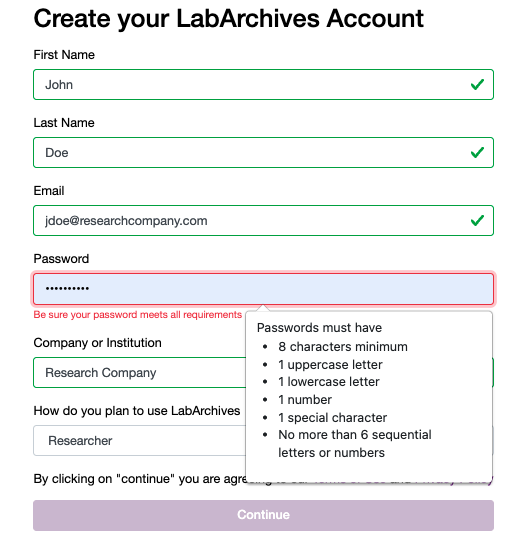
Complex Passwords
As part of our dedication to users’ security, LabArchives will now require complex passwords for non-SSO users. Passwords will expire every 6 months and the past 24 passwords cannot be reused. Existing users will gradually be prompted to update their passwords with an in-app message 14 days and an email 7 days before the password expiration date. Learn more about complex passwords.
SOC2 Certification Renewal
LabArchives continues to demonstrate our commitment to security with our renewal of SOC2 certification for our Electronic Lab Notebook. The SOC2 Type II audit of our ELN product focused on four major trust principles:
- Security
- Availability
- Processing Integrity
- Confidentiality
Compliance with SOC2 highlights the ways customers can be confident in placing their research and education information into our ELN. Find more information about the SOC2 audit or request access to the reports.

 Record, organize, search and share your scientific data
 Streamline organizing, tracking and ordering lab inventory
 Manage and schedule lab equipment and resources
 Secure, compliant, government-approved solution